

多模態#
學習如何使用 LLM 處理圖像和音訊。
視覺#
通過 vision 能力,您可以讓模型接收圖像並回答有關它們的問題。在 Xinference 中,這表示某些模型在通過 Chat API 進行對話時能夠處理圖像輸入。
支援的模型列表#
在 Xinference 中支援 vision 功能的模型如下:
qwen-vl-chat
deepseek-vl-chat
omnilmm
cogvlm2
MiniCPM-Llama3-V 2.5
glm-edge-v
快速入門#
模型可以透過兩種主要方式獲取圖像:透過傳遞圖像的連結或直接在請求中傳遞 base64 編碼的圖像。
使用 OpenAI 用戶端的範例#
import openai

client = openai.Client(
    api_key="cannot be empty",
    base_url=f"http://<XINFERENCE_HOST>:<XINFERENCE_PORT>/v1"
)
response = client.chat.completions.create(
    model="<MODEL_UID>",
    messages=[
        {
            "role": "user",
            "content": [
                {"type": "text", "text": "What’s in this image?"},
                {
                    "type": "image_url",
                    "image_url": {
                        "url": "http://i.epochtimes.com/assets/uploads/2020/07/shutterstock_675595789-600x400.jpg",
                    },
                },
            ],
        }
    ],
)
print(response.choices[0])
上傳 Base64 編碼的圖片#
import openai
import base64

# Function to encode the image
def encode_image(image_path):
with open(image_path, "rb") as image_file:
    return base64.b64encode(image_file.read()).decode('utf-8')

# Path to your image
image_path = "path_to_your_image.jpg"

# Getting the base64 string
b64_img = encode_image(image_path)

client = openai.Client(
    api_key="cannot be empty",
    base_url=f"http://<XINFERENCE_HOST>:<XINFERENCE_PORT>/v1"
)
response = client.chat.completions.create(
    model="<MODEL_UID>",
    messages=[
        {
            "role": "user",
            "content": [
                {"type": "text", "text": "What’s in this image?"},
                {
                    "type": "image_url",
                    "image_url": {
                        "url": f"data:image/jpeg;base64,{b64_img}",
                    },
                },
            ],
        }
    ],
)
print(response.choices[0])
限制每輪對話中的圖片數量#
對於使用 VLLM 後端的視覺模型,你可以透過 limit_mm_per_prompt 參數來限制每輪對話中可以處理的圖像數量。這有助於控制記憶體使用並提升效能。
# Launch model with image count limitation using Python client
from xinference.client import Client

client = Client("http://<XINFERENCE_HOST>:<XINFERENCE_PORT>")

# Launch model and set maximum 4 images per conversation turn
model_uid = client.launch_model(
    model_name="qwen2.5-vl-instruct",
    model_engine="vLLM",
    model_format="pytorch",
    quantization="none",
    model_size_in_billions=3,
    limit_mm_per_prompt="{\"image\": 4}"
)
或者,你可以使用命令列啟動模型:
# Launch model with image count limitation using CLI
xinference launch \
    --model-engine vLLM \
    --model-name qwen2.5-vl-instruct \
    --size-in-billions 3 \
    --model-format pytorch \
    --quantization none \
    --limit_mm_per_prompt "{\"image\":4}"
對於 Web UI,你可以在 vLLM 引擎表單中設定 limit_mm_per_prompt 參數:
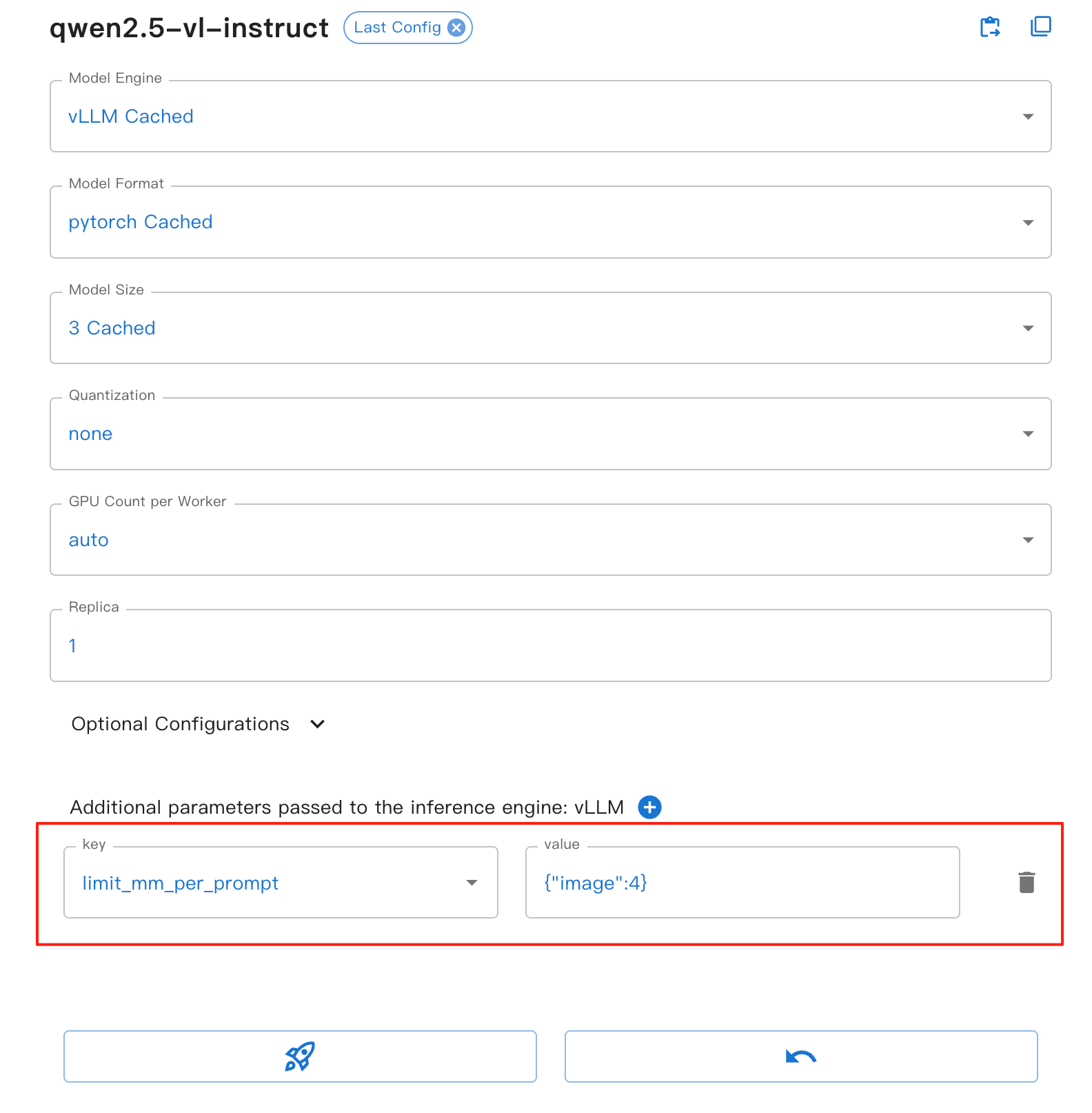
此參數提供以下好處:
image: 設定每輪對話中允許的最大圖像數量
有助於防止記憶體溢位,特別是在處理多張圖像時
提升模型推理的穩定性與效能
適用於所有基於 VLLM 的視覺模型
備註
limit_mm_per_prompt 參數僅在使用 VLLM 後端時生效。如果你的模型使用其他後端,此參數將被忽略。
你可以在教學筆記本中找到更多關於 vision 能力的範例。
透過使用 qwen-vl-chat 的範例來學習使用 LLM 的視覺能力
音頻#
通過「音頻」功能,您的模型可以接收音頻並執行音頻分析或根據語音指令直接生成文字回應。在 Xinference 中,這表示某些模型在透過 Chat API 進行對話時能夠處理音頻輸入。
支援的模型列表#
「音訊」功能在 Xinference 中支援以下模型:
快速入門#
音訊可以透過兩種主要方式提供給模型:透過傳遞圖片連結,或在請求中直接傳遞音訊 URL。
帶有音訊的聊天#
from xinference.client import Client

client = Client("http://<XINFERENCE_HOST>:<XINFERENCE_PORT>")
model = client.get_model(<MODEL_UID>)

messages = [
    {"role": "system", "content": "You are a helpful assistant."},
    {
        "role": "user",
        "content": [
            {
                "type": "audio",
                "audio_url": "https://qianwen-res.oss-cn-beijing.aliyuncs.com/Qwen2-Audio/audio/glass-breaking-151256.mp3",
            },
            {"type": "text", "text": "What's that sound?"},
        ],
    },
    {"role": "assistant", "content": "It is the sound of glass shattering."},
    {
        "role": "user",
        "content": [
            {"type": "text", "text": "What can you do when you hear that?"},
        ],
    },
    {
        "role": "assistant",
        "content": "Stay alert and cautious, and check if anyone is hurt or if there is any damage to property.",
    },
    {
        "role": "user",
        "content": [
            {
                "type": "audio",
                "audio_url": "https://qianwen-res.oss-cn-beijing.aliyuncs.com/Qwen2-Audio/audio/1272-128104-0000.flac",
            },
            {"type": "text", "text": "What does the person say?"},
        ],
    },
]
print(model.chat(messages))