

推理引擎#
Xinference 對於不同模型支援不同的推理引擎。使用者選擇模型後,Xinference 會自動選擇合適的引擎。
llama.cpp#
Xinference 目前支援由 Xinference 團隊開發的 xllamacpp 作為 llama.cpp 後端運行。llama.cpp 基於張量庫 ggml 開發,支援 LLaMA 系列模型及其變體的推理。
警告
從 Xinference v1.5.0 開始,xllamacpp 成為 llama.cpp 的預設選項,llama-cpp-python 已被棄用;從 Xinference v1.6.0 開始,llama-cpp-python 已被移除。
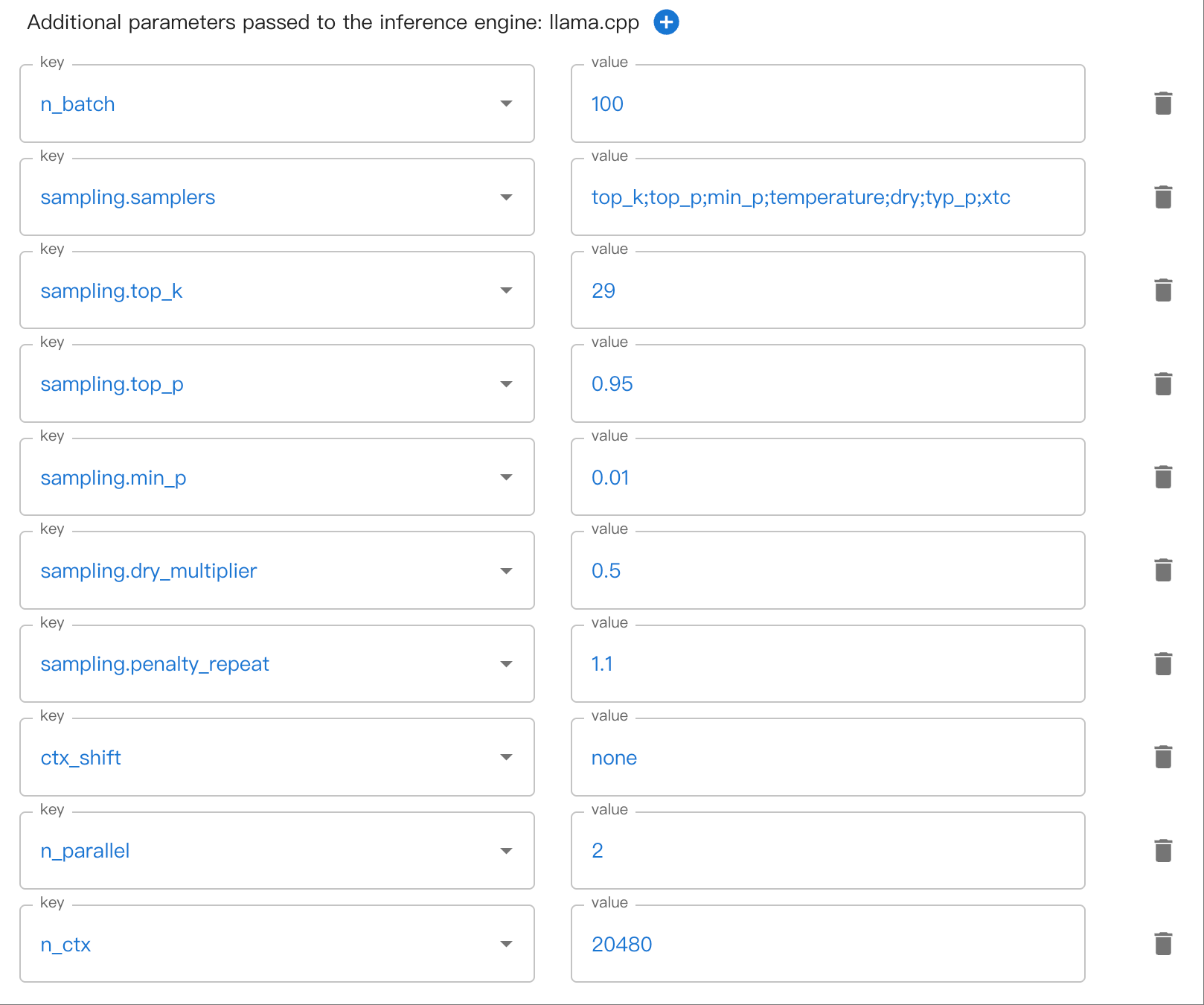
請參考 llama.cpp 的 common.h 中 common_params 結構體定義設置參數。
可能會有多層巢狀的參數。例如,sampling.top_k。請使用 . 來分隔巢狀參數。
這裡有一個在 WebUI 中設定巢狀採樣參數的範例:
自動 NGL#
在 v1.6.1 版被加入: 自 v1.6.1 起,當未指定 n-gpu-layers(預設為 -1)時,將自動啟用 GPU 層數估算功能。
此功能可為 llama.cpp 後端自動設定 GPU 層數(NGL)。請注意,這並非精確計算,因此 -ngl 結果可能非最佳,且仍可能遇到視訊記憶體不足的錯誤。
目前自動 NGL 沒有官方支援。請參考下面 issue 來了解更多詳細資訊:
我們的實作是基於 Ollama 的自動 NGL,但有一些不同之處:
我們使用 xllamacpp 提供的設備資訊。
我們移除了某些不常見的架構支援,這些架構會使用預設的運算邏輯。
如果自動 NGL 失敗,我們會嘗試全部載入到 GPU。
我們不支援多模態投影器內嵌到模型的 GGUF,這種格式的模型目前仍處於實驗階段。
常見問題#
Server error: {'code': 500, 'message': 'failed to process image', 'type': 'server_error'}
服務端日誌:
encoding image or slice...
slot update_slots: id  0 | task 0 | kv cache rm [10, end)
srv  process_chun: processing image...
ggml_metal_graph_compute: command buffer 0 failed with status 5
error: Internal Error (0000000e:Internal Error)
clip_image_batch_encode: ggml_backend_sched_graph_compute failed with error -1
failed to encode image
srv  process_chun: image processed in 2288 ms
mtmd_helper_eval failed with status 1
slot update_slots: id  0 | task 0 | failed to process image, res = 1
可能由於記憶體不足導致。你可以嘗試縮小
n_ctx解決。Server error: {'code': 400, 'message': 'the request exceeds the available context size. try increasing the context size or enable context shift', 'type': 'invalid_request_error'}
如果你正在使用 multimodal 功能,
ctx_shift會被預設關閉。請嘗試增加n_ctx或者減小n_parallel以增加每個 slot 的 context 大小。Server error: {'code': 500, 'message': 'Input prompt is too big compared to KV size. Please try increasing KV size.', 'type': 'server_error'}
服務端日誌:
ggml_metal_graph_compute: command buffer 1 failed with status 5
error: Insufficient Memory (00000008:kIOGPUCommandBufferCallbackErrorOutOfMemory)
graph_compute: ggml_backend_sched_graph_compute_async failed with error -1
llama_decode: failed to decode, ret = -3
srv  update_slots: failed to decode the batch: KV cache is full - try increasing it via the context size, i = 0, n_batch = 2048, ret = -3
可能由於 KV cache 創建失敗導致。你可以透過減小
n_ctx或者增加n_parallel或者調節n_gpu_layers參數載入部分模型到 GPU 來解決。請注意,如果你只處理串行推理請求,增加n_parallel並不會帶來效能提升。
transformers#
Transformers 支援絕大部分新推出的模型。是 Pytorch 格式模型預設使用的引擎。
vLLM#
vLLM 是一個非常高效且易用的大型語言模型推理引擎。
vLLM 具有以下特點:
領先的推理吞吐量
使用 PagedAttention 高效管理注意力鍵和值記憶
對傳入請求進行連續批次處理
最佳化的 CUDA 核心
當滿足以下條件時,Xinference 會自動選擇 vLLM 作為推理引擎:
模型格式為
pytorch,gptq,awq,fp4,fp8或者bnb。當模型格式為
pytorch時,量化選項需為none。当模型格式為
awq時,量化選項需為Int4。當模型格式為
gptq時,量化選項需為Int3,Int4或Int8。作業系統為 Linux 並且至少有一個支援 CUDA 的裝置
自訂模型的
model_family欄位與內建模型的model_name欄位在 vLLM 的支援清單中。
目前,支援的模型包括:
code-llama,code-llama-instruct,code-llama-python,deepseek,deepseek-chat,deepseek-coder,deepseek-coder-instruct,deepseek-r1-distill-llama,gorilla-openfunctions-v2,HuatuoGPT-o1-LLaMA-3.1,llama-2,llama-2-chat,llama-3,llama-3-instruct,llama-3.1,llama-3.1-instruct,llama-3.3-instruct,minicpm5-1b,tiny-llama,wizardcoder-python-v1.0,wizardmath-v1.0,Yi,Yi-1.5,Yi-1.5-chat,Yi-1.5-chat-16k,Yi-200k,Yi-chatcodestral-v0.1,mistral-instruct-v0.1,mistral-instruct-v0.2,mistral-instruct-v0.3,mistral-large-instruct,mistral-nemo-instruct,mistral-v0.1,openhermes-2.5,seallm_v2Baichuan-M2,codeqwen1.5,codeqwen1.5-chat,deepseek-r1-distill-qwen,DianJin-R1,fin-r1,HuatuoGPT-o1-Qwen2.5,KAT-V1,marco-o1,qwen1.5-chat,qwen2-instruct,qwen2.5,qwen2.5-coder,qwen2.5-coder-instruct,qwen2.5-instruct,qwen2.5-instruct-1m,qwenLong-l1,QwQ-32B,QwQ-32B-Preview,seallms-v3,skywork-or1,skywork-or1-preview,XiYanSQL-QwenCoder-2504llama-3.2-vision,llama-3.2-vision-instructbaichuan-2,baichuan-2-chatInternLM2ForCausalLMqwen-chatmixtral-8x22B-instruct-v0.1,mixtral-instruct-v0.1,mixtral-v0.1cogagentglm-edge-chat,glm4-chat,glm4-chat-1mcodegeex4,glm-4vseallm_v2.5orion-chatqwen1.5-moe-chat,qwen2-moe-instructCohereForCausalLMdeepseek-v2-chat,deepseek-v2-chat-0628,deepseek-v2.5,deepseek-vl2deepseek-prover-v2,deepseek-r1,deepseek-r1-0528,deepseek-v3,deepseek-v3-0324,Deepseek-V3.1,moonlight-16b-a3b-instructdeepseek-r1-0528-qwen3,qwen3minicpm3-4binternlm3-instructgemma-3-1b-itglm4-0414minicpm-2b-dpo-bf16,minicpm-2b-dpo-fp16,minicpm-2b-dpo-fp32,minicpm-2b-sft-bf16,minicpm-2b-sft-fp32,minicpm4Ernie4.5Qwen3-Coder,Qwen3-Instruct,Qwen3-Thinkingglm-4.5,GLM-4.6,GLM-4.7gpt-ossseed-ossQwen3-Next-Instruct,Qwen3-Next-ThinkingDeepSeek-V3.2,DeepSeek-V3.2-ExpMiniMax-M2,MiniMax-M2.5,MiniMax-M2.7GLM-4.7-Flashglm-5,glm-5.1DeepSeek-V4-Flash,DeepSeek-V4-Pro
SGLang#
SGLang 具有基於 RadixAttention 的高效能推理執行環境。它透過在多個呼叫之間自動重複使用 KV 快取,顯著加速了複雜 LLM 程式的執行。它也支援其他常見推理技術,如連續批次處理與張量平行處理。
MLX#
MLX 提供了在 Apple Silicon 晶片上高效運行 LLM 的方式。當模型包含 MLX 格式時,建議使用 Apple Silicon 晶片的 Mac 使用者採用 MLX 引擎。